Your AI paperwork, built from real data
When your DPO, a client or an inspector asks how you use AI, you will have the answer in writing: which tools, with which data, what was protected and who has accepted the policy. Acotia prepares it from what it already records, without reading any conversation.
Updated
Why now
If your team uses AI with client or patient data, obligations already apply. The GDPR requires a record of processing activities (article 30) and, where the risk is high, an impact assessment (article 35). And since February 2025, article 4 of the EU AI Act requires companies to take measures so that their staff know how to use AI sensibly. Almost no small company has this paperwork up to date, and doing it by hand takes weeks.
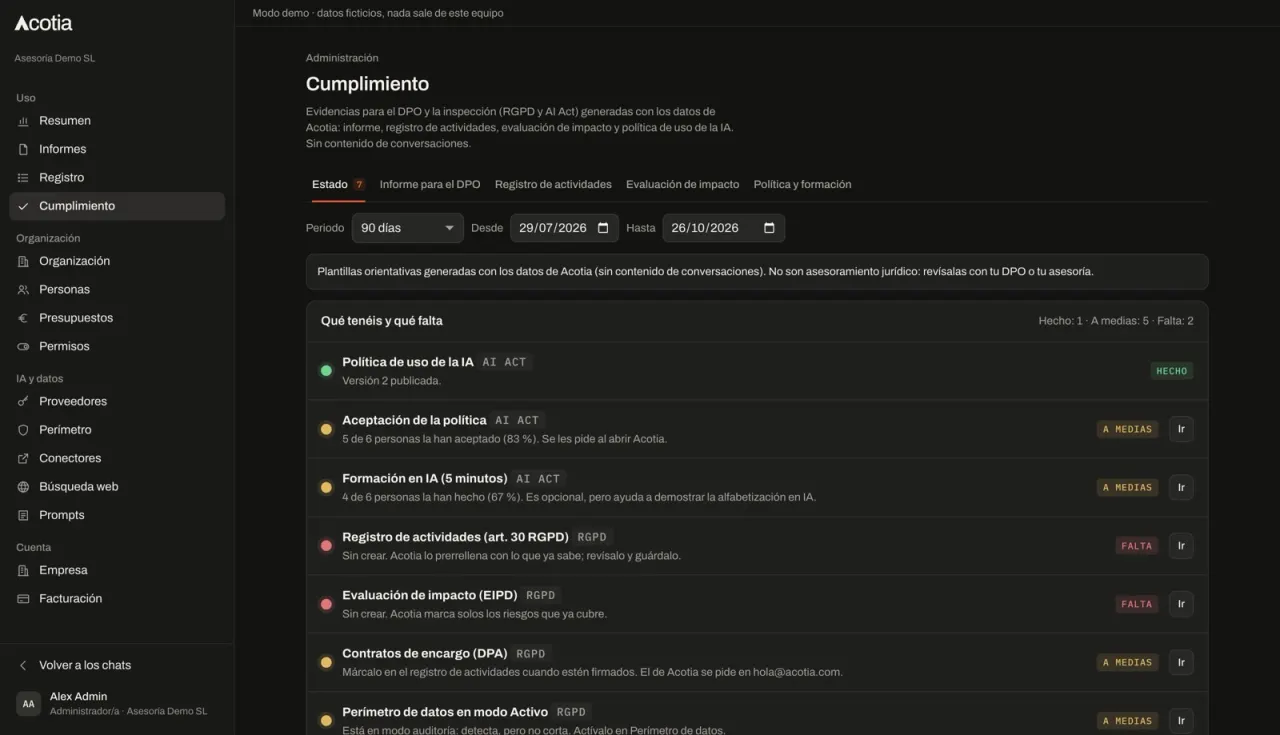
Status: what you have and what is missing
An eight-point traffic light: AI use policy published, how many people have accepted it, how many have done the training, record of processing, impact assessment, processing agreements with providers, data perimeter active, and data leaving the EU. Each point in green, amber or red, with a button that takes you to where it gets fixed.
Report for the DPO or an inspection
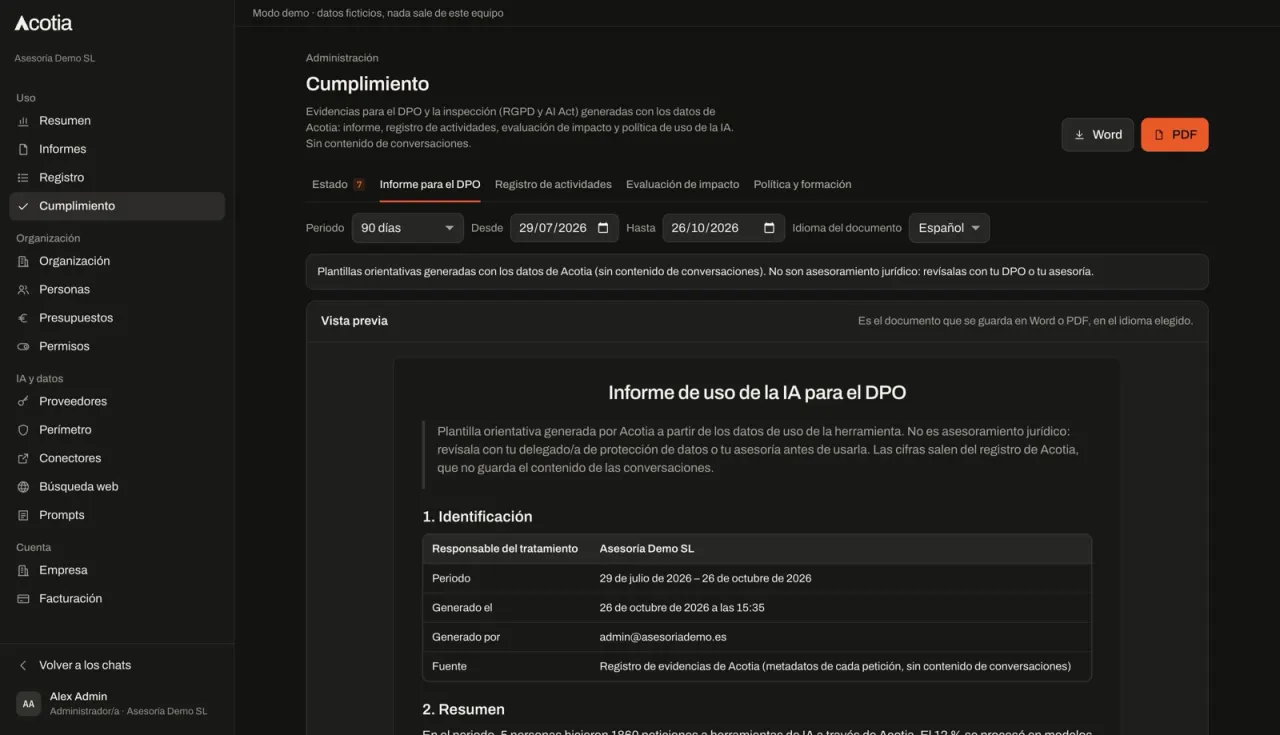
You choose the period and Acotia drafts the report in Word or PDF, in Spanish, Catalan or English. It covers which tools and models were used and where they are hosted (inside or outside the EU), how many requests, which kinds of personal data were detected and what was done with them (masked, blocked or sent to an EU model), the alerts and blocks of the period, policy changes, technical measures, the providers involved, and who has accepted the policy and done the training.
Record of processing (GDPR article 30)
The “use of AI assistants” processing activity arrives already filled in with what Acotia knows: data categories seen in the period, providers, transfers outside the EU, retention periods and security measures. You review it, complete what is missing, tick which processing agreements are signed and save it.
Impact assessment (DPIA)
A draft with twelve typical risks of using AI. The ones Acotia already covers given your configuration (for example, health data being masked or EU-hosted models) are ticked automatically. You complete the rest with likelihood, impact and measures, and close with the conclusion and sign-off.
Use policy with acceptance and training
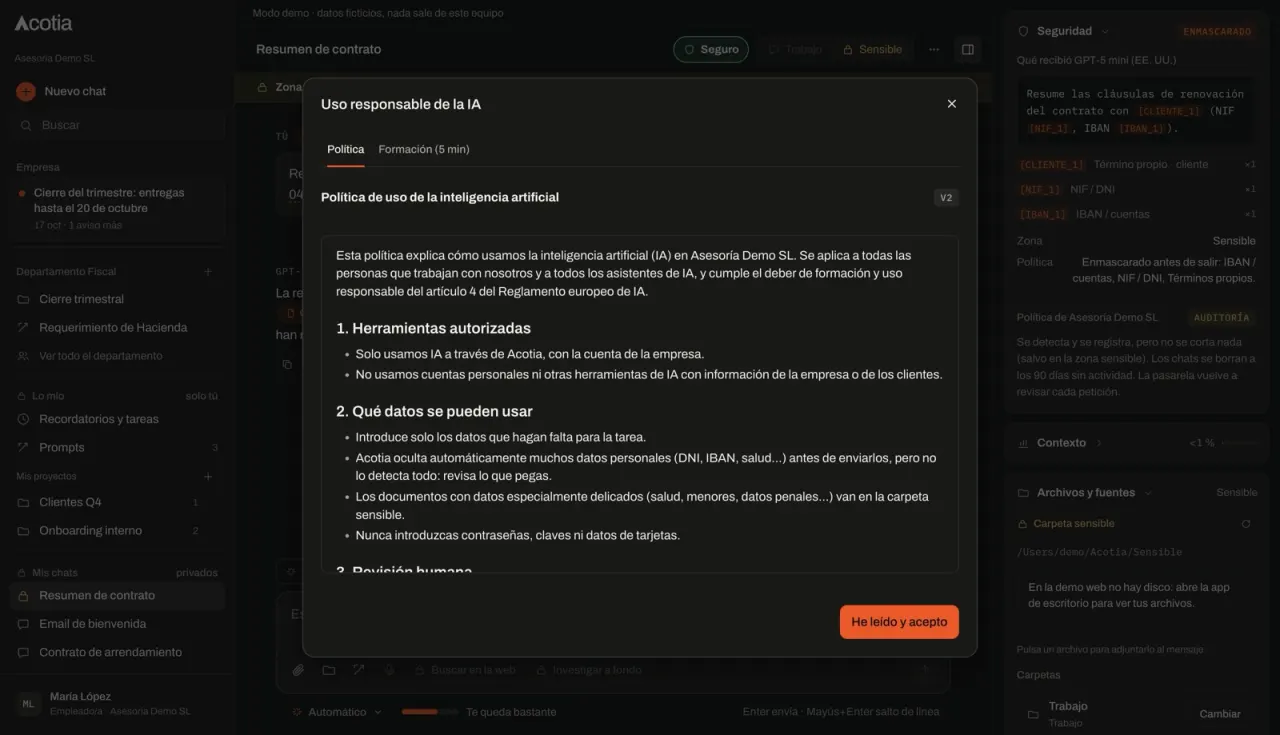
An AI use policy template you can edit and publish in versions. Each person sees it when they open Acotia and cannot continue until they accept it; if you publish a new version, it is requested again (a minor change, such as a typo, is not). Plus a five-minute training with five lessons and six questions: who did it, when and with what score is recorded, never their answers. It is the simplest way to show you have acted on article 4.
It never reads conversations
Everything comes from the evidence log: who, when, with which model, which data categories were detected and what was done. Chat text is not stored on the server and does not go into any document. The record of processing and the impact assessment only contain what the company admin writes.
What it does not do
It is not legal advice: these are guidance templates for your DPO or advisers to review, and every document says so. It only covers AI that goes through Acotia; if someone uses other tools on their own, they do not appear. And it does not make the company “compliant” on its own: it gives you the evidence and the drafts, but decisions, sign-offs and the obligations of model providers or high-risk systems stay outside. We also explain this on Trust.
Which plan it is in
The compliance module is part of the Profesional plan (see pricing). If a company moves to Esencial, nothing is deleted: the policy, acceptances, training, record and assessment are kept and become available again on returning to Profesional. Meanwhile, nobody is asked to accept the policy.
Frequently asked questions
What does article 4 of the AI Act ask of a small company?
That it takes measures so that people using AI at work have sufficient knowledge, given their role and how they use it. It does not require a certificate or a specific level. A use policy accepted by each person and documented training are a reasonable basis, and that is exactly what this module records.
Does it replace my DPO or advisers?
No. It saves them the work of gathering data and drafting, but they review and decide. Every document says so.
Does Acotia see what my team writes?
No. The documents are built from metadata (who, when, model, data category and action), never from the text of conversations.
What happens if someone does not accept the policy?
Until they accept it, Acotia shows them the policy on opening and they cannot keep using it. The compliance status shows who has accepted and who has not.
Is it included in the Esencial plan?
No, it is part of the Profesional plan. During a pilot we can enable it until the pilot ends.